Strategic Interview Questions for Successful Hiring

In the ever-competitive business world, the right hire can be a game-changer for your company’s growth and culture. To identify the perfect candidate, it’s crucial to ask the right strategic interview questions. These questions go beyond the resume to delve into a candidate’s thought processes, problem-solving abilities, and cultural fit.

This article will provide insight into the key strategic interview questions to ask candidates and why they’re important. We’ll also touch on some unique interview questions that can reveal more about a candidate’s potential fit within your company.

The Importance of Strategic Interview Questions

Interviews are a critical component of the hiring process, serving as a platform to evaluate a candidate’s qualifications and compatibility with your organization. But not all questions yield the same depth of information. Strategic interview questions are designed to uncover more than just surface-level details, providing a comprehensive understanding of the candidate’s capabilities and personality.

Going Beyond the Resume

Candidate's resumeby Amy Hirschi (https://unsplash.com/@amyhirschi)

A resume can show you a candidate’s history and skills, but it doesn’t provide insight into their approach to real-world problems. Strategic interview questions enable you to see beyond the resume and assess how a candidate might perform in the role and adapt to your company’s environment.

Assessing Cultural Fit

Cultural fit is a vital factor in the longevity and success of a hire. Strategic questions can help you determine how well a candidate’s values align with your organization’s culture. This alignment is crucial for ensuring a seamless integration into the team and fostering a positive work environment.

Identifying Problem-Solving Abilities

Every role comes with its challenges, and the ability to tackle them effectively is a valuable trait. By posing strategic interview questions, you can gain insight into a candidate’s problem-solving skills and their approach to overcoming obstacles.

Crafting Strategic Interview Questions

To get the most out of the interview process, it’s essential to craft questions that will reveal critical aspects of a candidate’s professional character and potential. Here are some categories of strategic interview questions and examples to consider.

Questions About Experience and Skills

While the candidate’s resume will outline their past experiences, you want to dig deeper with your questions to understand how those experiences have shaped them professionally.

Example Questions:

  • Can you tell me about a time when you had to learn a new skill to complete a task? How did you approach this, and what was the outcome?
  • Describe a project you’re particularly proud of. What was your role, and what made it successful?

Questions to Gauge Problem-Solving Abilities

Problem-solving questions can reveal a lot about a candidate’s analytical skills and decision-making processes.

Example Questions:

  • Tell me about a challenge you faced in a previous role and how you addressed it.
  • How would you approach a situation where you’re assigned a project with an unfamiliar topic or industry?

Behavioral Interview Questions

Behavioral interview questions are based on the premise that past behavior is the best predictor of future behavior. They focus on how the candidate has handled situations in the past, which can give you insight into how they might perform in your organization.

Example Questions:

  • Describe a time when you had to work closely with someone whose personality was very different from yours. How did you handle it?
  • Give an example of a goal you reached and tell me how you achieved it.

Questions About Adaptability

In today’s fast-paced business environment, adaptability is a key trait. These questions help assess how well a candidate can adjust to changes and remain effective.

Example Questions:

  • How do you handle change, and can you provide an example of adapting to a significant change at work?
  • Can you discuss a time when a project didn’t go as planned and how you managed the situation?

Unique Interview Questions to Ask Employer

Interview sessionby 2H Media (https://unsplash.com/@2hmedia)

Candidates often have their own questions during an interview. As an employer, be prepared to answer unique and thoughtful questions that candidates may pose to assess the company’s fit for them.

Example Questions Candidates Might Ask:

  • How does your company support professional development and growth?
  • Can you describe the company culture and how you see it evolving in the future?

Strategic Interview Questions to Ask Candidates

Let’s dive into specific strategic interview questions designed to help you evaluate a candidate’s fit for the position and your company culture.

Questions to Uncover Work Style and Ethics

Understanding a candidate’s work style and ethics is crucial to predicting how they’ll perform and interact with your team.

Example Questions:

  • How do you prioritize your work when you have multiple projects with the same deadline?
  • Tell me about a time when you had to make a difficult ethical decision at work. What was the situation, and how did you resolve it?

Questions to Evaluate Team Dynamics

Team dynamics are critical to a productive workplace. These questions aim to uncover how a candidate functions within a team setting.

Example Questions:

  • Describe a situation where you had to collaborate with a difficult team member. How did you handle it?
  • What role do you typically play in team projects and why?

Questions to Assess Leadership Potential

Even if the role isn’t a leadership position, understanding a candidate’s leadership potential is valuable for future growth within the company.

Example Questions:

  • Can you provide an example of a time when you had to lead a team through a challenging situation?
  • How do you motivate others, especially during tough projects or tight deadlines?

Questions About Vision and Ambition

A candidate’s vision and ambition can align with your company’s growth trajectory and goals.

Example Questions:

  • Where do you see yourself in five years, and how does this position align with your career goals?
  • Can you describe a professional achievement that you’re aiming for and how you plan to reach it?

Final Thoughts

The hiring process is an investment of time and resources, and the goal is to make a return on that investment with a successful hire. Strategic interview questions play a crucial role in evaluating the suitability of a candidate for your organization.

By asking well-thought-out questions, you can uncover a candidate’s true potential, ensuring that your new hire not only has the right skills but also fits seamlessly into your company’s culture and contributes to its success.

Remember to listen carefully to the candidate’s responses and consider their implications for the role and your company. With the right questions and a discerning ear, you can make informed decisions that will benefit your organization for years to come.

Handshake between interviewer and candidateby Amina Atar (https://unsplash.com/@minaslens)

Good luck with your next hiring process, and may you find the ideal candidate who will thrive in their new role and help drive your company forward.

Log File using system.out

Log File using system.out

If you want your System.out.print() output to be logged in the file rather than console, then that could also be possible by little trick.

OOP_SystemOutPrintln

Before we start,

System.out.print()
 :: System - Java Main Class
 :: out - Instance of PrintStream
 :: print() - A public Method

To achieve this we need to change the property of out using System-class.

System.setOut(PrintStream p);

PrintStream : The PrintStream class provides methods to write data to another stream. The PrintStream class automatically flushes the data so there is no need to call flush() method. Moreover, its methods don’t throw IOException.

Example:

package com.example;

import java.io.File;
import java.io.FileNotFoundException;
import java.io.PrintStream;

public class SystemOutINFile {
    public static void main(String arr[]) throws FileNotFoundException
    {
        // Creating a log file object
        PrintStream printObject = new PrintStream(new File("log.txt"));

        // Storing current System.out in PrintStream before assigning some new value
        PrintStream console = System.out;

        // Assign printObject to output stream
        System.setOut(printObject);
        System.out.println("Whatever will be here in this function, it will go to text file");

       // Reassign the value for output stream
       System.setOut(console);
       System.out.println("console output");
    }
}

Hurray , That’s it….

Thanks for your time , Have a good Day 🙂

Pushpraj Kumar

Change Hive metastore from derby to MySQL

Change Hive metastore from derby to MySQL


Machine : UBUNTU-14.04 | Hive : HIve 1.2.1

To change Hive Metastore from Derby to MySQL we need to follow these 8 simple steps,


Step-1 :

First we need to install Mysql and its dependencies on system.

Command-1 : sudo apt-get install mysql-server

Note: Click Next > Next and set the password for MySQL.

Command-2 : sudo apt-get install libmysql-java


Step-2 :

Create soft-link for connector in Hive lib directory.

Command-1 : ln -s /usr/share/java/mysql-connector-java.jar $HIVE_HOME/lib/mysql-connector-java.jar


Step-3 :

Access your MySQL and create one new database metastore for hive,

Command : $ mysql -u root -p

Enter password:

mysql> CREATE DATABASE metastore;


Step-4 :

Then we need one MySQL account for Hive to access the metastore. It is very important to prevent this user account from any type of change in schema.

Command :

mysql> CREATE USER ‘hive’@’%’ IDENTIFIED BY ‘password’;

mysql> GRANT all on *.* to ‘hive’@localhost identified by ‘password’;

mysql> flush privileges;


Step-5 :

Now we need to configure Hive to access MySQL metastore, for this we need to update hive-site.xml file(If file does not exist then create a new one)

<configuration>

<property>

<name>javax.jdo.option.ConnectionURL</name>

<value>jdbc:mysql://192.168.8.99/metastore?createDatabaseIfNotExist=true</value>

<description>metadata is stored in a MySQL server</description>

</property>

<property>

<name>javax.jdo.option.ConnectionDriverName</name>

<value>com.mysql.jdbc.Driver</value>

<description>MySQL JDBC driver class</description>

</property>

<property>

<name>javax.jdo.option.ConnectionUserName</name>

<value>hive</value>

<description>user name for connecting to mysql server</description>

</property>

<property>

<name>javax.jdo.option.ConnectionPassword</name>

<value>password</value>

<description>password for connecting to mysql server</description>

</property>

</configuration>


Note: While updating please take all properties-tag only.


Step-6 :

Now we need to run the Hive schematool to initialization MySQL metastore.

For this we need to go to $HIVE_HOME>bin> folder

Command-1 : schematool -initSchema -dbType mysql

Note : When you have found that your metastore is corrupted, then we need to update metastore.

  • Before you run hive for the first time, run

Command : schematool -initSchema -dbType mysql

  • If you already ran hive and then tried to initSchema and if it’s failing:

Command : mv metastore_db metastore_db.tmp

You find your metasore_db file at $HIVE_HOME location.

  • Re run


Step-7 :

Start your Hive and access your tables.


Step-8 :

To validate it ,

Connect and open your hive

hive>

Then create a table in it and insert one record.

hive> create table saurzcode(id int, name string);

hive> insert into saurzcode(1, “Helical”);

Later access your MySQL and open metastore database

mysql -u root -p

Enter password:

mysql> use metastore;

And see your table as a record in TBLS table of metastore database.

mysql> show tables ;

mysql> select * from TBLS;


Hurray, Completed !!!!

Thanks for visiting , Have a great day.

PUSHPRAJ KUMAR

Collection Part-1 : Java Arrays

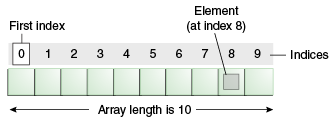
Arrays are objects which store multiple variables of the same type, it is a collection of similar type of elements that have contiguous memory location.

The length of an array is established when the array is created. After creation, its length is fixed.

array10No

An array of 10 elements.

It is an array of size 10, means we can store 10-elements in a single variable/object.

Define an array:

int[] arr = new int[10];

int[] arr ={1,2,3,4,5};

//We can give any number here. It will allocate 10 int-variable space in JVM heap section.

Starting with arr[0]=10;

to

arr[arr.length -1] =100; // arr.length -1=9 , because we are starting from 0 index.

How to copy one array content to another array,

public static void arraycopy( Object sourceArray, int sourceArrayPositionPos, Object destinationArray, int destinationArrayPosition, int length )


src — This is the source array.

srcPos — This is the starting position in the source array.

dest — This is the destination array.

destPos — This is the starting position in the destination data.

length — This is the number of array elements to be copied.

Use this function to copy one array into another . Ex: //here declaration, instantiation and initialization all are done at a time int[] arr ={8,7,6,5,4,3,2,2,0}; //Assume it is a sourceArray. int[] FinalArr = new int[9]; //Assume it is a destination array , where you want to copy your content. So copy command is:

System.arraycopy(arr, 0, FinalArr, 0, arr.length); //to print this destination/Targeted array.

for(int i=0;i<arr.length;i++)

{ System.out.println(“Value-”+i+” are : ”+FinalArr[i]); }

O/P

Value-0 are : 8

Value-1 are : 7

Value-2 are : 6

Value-3 are : 5

Value-4 are : 4

Value-5 are : 3

Value-6 are : 2

Value-7 are : 2

Value-8 are : 0

EX:

int c1[][][][]={{{{1,3,4},{3,4,5},{1,2,3}},{{1,3,4},{3,4,5},{1,2,3}},{{1,3,4},{3,4,5},{1,2,3}}},{{{1,3,4},{3,4,5},{1,2,3}},{{1,3,4},{3,4,5},{1,2,3}},{{1,3,4},{3,4,5},{1,2,3}}}};

for(int i=0;i<2;i++){

for(int j=0;j<3;j++){

for(int k=0;k<3;k++){

for(int l=0;l<3;l++){

System.out.print(c1[i][j][k][l]+””);

}

}

System.out.print(“\t”);

}

System.out.print(“\n”);

}

O/P

134345123 134345123 134345123
134345123 134345123 134345123

Enjoy learning…. 🙂

Batch-Updation in Hibernate

Batch Updation in Hibernate

JDBC has long been offering support for DML statement batching. By default, all statements are sent one after the other, each one in a separate network round-trip. Batching allows us to send multiple statements in one-shot, saving unnecessary socket stream flushing.

Hibernate hides the database statements behind a transactional write-behind abstraction layer. An intermediate layer allows us to hide the JDBC batching semantics from the persistence layer logic. This way, we can change the JDBC batching strategy without altering the data access code.

Update code snippet look like this ,

Session session = sessionFactory.openSession();
Transaction txInstance = session.beginTransaction();
ScrollableResults studentInstance = session.createQuery("FROM STUDENT").scroll();
int count =0;
while( studentInstance.next())
{
   Student student =(Student) studentInstance.get(Student.class,StudentID); 
   student.setregNo( regNO );
   session.update(student);
  // 50 - size of batch which you set earlier.
  // For Detail "http://helicaltech.com/batch-insertion-in-hibernate/"
   if(++count %50==0)
   {
      session.flush();
      session.clear();
   }
}
txInstance.commit();
session.close();

----------------------------------


PUSHPRAJ KUMAR (BI Developer)

Batch-Insertion in Hibernate

Batch-Insertion in Hibernate

To enable batch-processing to upload a large number of records into your database using Hibernate.

If you are undertaking batch processing you will need to enable the use of JDBC batching. This is absolutely essential if you want to achieve optimal performance. Set the JDBC batch size to a reasonable number (10-50, for example):

hibernate.jdbc.batch_size 20

the code snippet look like this ,

Session session = sessionFactory.openSession();
Transaction txInstance = session.beginTransaction();
   
for ( int i=0; i<100000; i++ ) {
    Student student = new Student(.....);
    session.save(student);
    if ( i % 40 == 0 ) { 
        session.flush();
        session.clear();
    }
}
   
txInstance.commit();
session.close();

When making new objects persistent flush() and then clear() the session regularly in order to control the size of the first-level cache because by default, Hibernate will cache all the persisted objects in the session-level cache and ultimately your application would fall over with an OutOfMemoryException.

A JDBC batch can target one table only, so every new DML statement targeting a different table ends up the current batch and initiates a new one. Mixing different table statements is therefore undesirable when using SQL batch processing.

PUSHPRAJ KUMAR (BI Developer)


How to use system commands in LUA

How to use system commands in LUA

Lets assume we have some requirement to call Unix-commands on the click of a button by using LUA .

To achieve this follow these steps :
1. First check your Lua page is working or not ?
> Run your lua page to ensure that there is no any error in this page.

2. Now we need to configure template file in Lua page.(or you can do it by lua codes also but it has limited CSS )
> For this we need first to create/implement template page in lua file.

Ex : lets assume you have one lua file name (details.lua) .
So first you need to create map in your lua page.
(for detail please refer this blog : http://helicaltech.com/use-lua-web-script/)

Now you configure your template(getData.htm) in lua file.

<%+cbi/valueheader%>
<input type=”button” value=”Set” style=”width:71px;” onclick=”<%-=pcdata(self:getData(section))-%>” />
<%+cbi/valuefooter%>

Now in your lua page (details.lua) , you need to write this function.

test1 = readData:option(Value, “_custom”,translate(“Get Data “),”help text “)
readData.nocreate = true
readData.widget = “checkbox”
readData.template = “cbi/getData”
function readData.getData(self,section)
ptr1 =”/usr/bin/runScript start”
os.execute(ptr1)
end

By this way we can run any system-command as value of ptr1

like “ls -ltrh /usr/bin >>/tmp/fileDetails.txt” ….etc

and run on the OS indirectly via LUA page.

Pushpraj Kumar.

JAVA POLICY FILE..


JAVA POLICY FILE Apps-File-Java-icon


The Java™ 2 Platform, Enterprise Edition (J2EE) Version 1.3 and later specifications have a well-defined programming model of responsibilities between the container providers and the application code.

 
The java.policy file is a global default policy file that is shared by all of the Java programs that run in the Java virtual machine (JVM) on the node. A change to the java.policy file is local for the node.

 
The java.policy file is not a configuration file that is managed by the repository and the file replication service. Changes to this file are local and do not get replicated to the other machine.
By using this feature we can control the execution ,
To set the run-time permissions such that Java won’t grant the global permissions. Then you can specify only the permissions you want granted for your app. The key is to run your app with the options below.

java -Djava.security.manager -Djava.security.policy==policyFile.txt MyClass

Note the double equals -Djava.security.policy==policyFile.txt. The double equals == means to use only the permissions in the named file as opposed to the single equal sign -Djava.security.policy=policyFile.txt which means use these permissions in addition to the inherited global permissions.

 
Then create a policy file excluding the permissions you want to deny:

//policyFile.txt
grant codeBase “file:/C:/abc.jar” {
//list of permissions minus the ones you want to deny
//for example , the following give the application
//ONLY AudioPermission and AWTPermission. Other permission such as
//java.io.FilePermission would be denied.
permission javax.sound.sampled.AudioPermission;
permission java.awt.AWTPermission;
}

NOTE : {app_server_root}/java/jre/lib/security/java.policy. Default permissions are granted to all classes. The policy of this file applies to all the processes launched by `Application Server.


Pushpraj Kumar

WATCHDOG

WATCHDOG

INTRODUCTION

For those embedded systems that can’t be constantly watched by a human, watchdog timers may be the solution.

The watchdog timer is an important device in the embedded system , which is used to develop reliable products. Most of the embedded systems need to be self-reliant in order to restart and restore the system if any software bug disturbs the system. It is not always possible for human operators to wait for rebooting the system for every software problem. The watchdog timer is a piece of hardware that provides ultimate solutions for the real-time industries, which used to detect system abnormalities automatically and to reset the processor.

attiny10-blinker_yamaguchi_flash


Watchdog Timers(WDT)

A watchdog timer is a piece of hardware that can be used to automatically detect software anomalies and reset the processor if any occur. Generally speaking, a watchdog timer is based on a counter that counts down from some initial value to zero. The embedded software selects the counter’s initial value and periodically restarts it. If the counter ever reaches zero before the software restarts it, the software is presumed to be malfunctioning and the processor’s reset signal is asserted. The processor (and the embedded software it’s running) will be restarted as if a human operator had cycled the power.

Figure 1 shows a typical arrangement. As shown, the watchdog timer is a chip external to the processor. However, it could also be included within the same chip as the CPU. This is done in many micro-controllers. In either case, the output from the watchdog timer is tied directly to the processor’s reset signal.

image1

kicking the dog

The process of restarting the watchdog timer’s counter is sometimes called “kicking the dog.” The appropriate visual metaphor is that of a man being attacked by a vicious dog. If he keeps kicking the dog, it can’t ever bite him. But he must keep kicking the dog at regular intervals to avoid a bite. Similarly, the software must restart the watchdog timer at a regular rate, or risk being restarted.

Advantage of Watchdog Timers:

  • Resets automatically without human intervention.

  • Detects the errors in the program and reboot the system

  • Cost sensitive

  • Saves the time and money

  • No need to place the employers to monitor the software debugs.

  • Increases the system performance.

SUMMARY

A number of considerations must go into any design that uses a watchdog as a monitor. Once the timeout period is determined, the system software must be analyzed to determine where to locate the watchdog restart instructions. For an effective design, the number of watchdog restarts should be kept to a minimum, and some consideration should be given to the likelihood of incorrectly executing a restart. As mentioned previously, some system software is too convoluted or data-dependent to ensure that all software flow paths are covered by a watchdog restart. This may dictate that a self-diagnostic software approach might be required. If there is an expected failure mechanism such as a periodic EMI burst or power supply glitch, the watchdog timeout should consider this period.


Pushpraj Kumar 🙂

CUBES

 Cubes

The data structures used in the OLAP are multidimensional data cubes or OLAP cubes:

image1

An OLAP cube is a multidimensional database that is optimized for data warehouse and online analytical processing (OLAP) applications.

An OLAP cube is an array of data understood in terms of its 0 or more dimensions. OLAP is an acronym for online analytical processing. OLAP is a computer-based technique for analyzing business data in the search for business intelligence.

So, in simple it is the data presentation in multiple dimensions.

Example: A company needs survey of their products all over the world.

So for this it requires answer of some questions like

–          Sell in USA?

–          Sell in USA of different products?

–          Sell in USA of different products in last 6 month?

–          Sell in Other country and total sell?

–          What type of consumers attract by this product?

–          Product details, with sell?

…etc

In this case we need one master table/Fact table where we store values commonly used (like last month sell) and also the relation of other table by using foreign key (Customer detail , USA sell). In such a manner that data retrieve much faster as possible.

The OLAP cube consists of facts, also called measures, categorized by dimensions (it can be much more than 3 Dimensions; dimensions referred from Fact Table by “foreign keys”). Measures are derived from the records in the Fact Table and Dimensions are derived from the dimension tables, where each column represents one attribute (also called dictionary; dimension can have many attributes)

Facts and Measures

Fact is most detailed information that can be measured.

In simple it works like central control, which has information of whole cube like where we find which thing.

image2

OLAP Common operations include slice and dice, drill down, roll up, and pivot:

Slice:

A slice is a subset of a multi-dimensional array corresponding to a single value for one or more members of the dimensions not in the subset.

image3

Dice:

The dice operation is a slice on more than two dimensions of a data cube (or more than two consecutive slices).

image4

Drill Down/Up:

Drilling down or up is a specific analytical technique whereby the user navigates among levels of data ranging from the most summarized (up) to the most detailed (down).

image5

Roll-up:

(Aggregate, Consolidate) A roll-up involves computing all of the data relationships for one or more dimensions. To do this, a computational relationship or formula might be defined.

image6

Pivot:

This operation is also called rotate operation. It rotates the data in order to provide an alternative presentation of data – the report or page display takes a different dimensional orientation.

image7

Summary

OLAP cube is really helpful, when we are talking about billions of data. It is very easy and straightforward to translate business questions into multidimensional query.

By which we can really increase data performance as well as understandability of data in a better manner.

Reusability is also possible in cube, which make this more scalable.

Thanks for reading.